How to Maintain MIKI HOUSE Kids Camera


These are the instructions on how to maintain MIKI HOUSE Kids Camera. Please check the applicable instructions.
Products
KIDS CAMERA (16-1681-793)


For Ages:3+
<Set Contents>
- Camera ×1
- Silicone Cover ×1
- Strap ×1
- Instruction Manual x 1
- Charging Cable ×1 (Micro USB Type-C)
Instructions for use
Parts Description
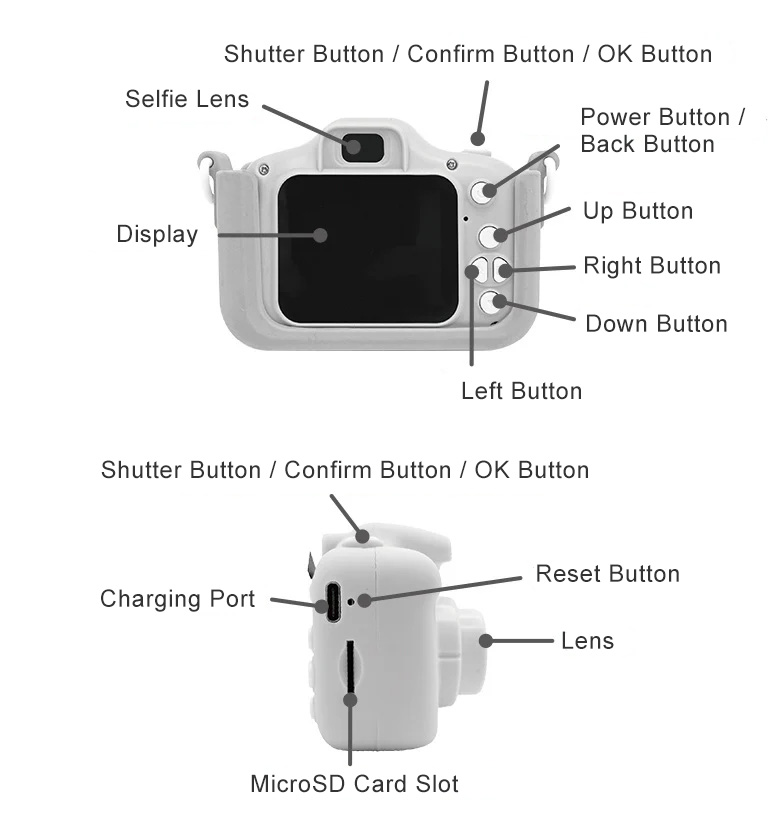
Product Specifications
| Display | 2.0 inch |
|---|---|
| Feature | Photo / Video Recording |
| Video Format | AVI |
| Battery Capacity | 600mAh |
| Charging Time | Approx. 1‒2 hours |
| Maximum number of photos | 30 (without MicroSD card) |
| Storage | Supports MicroSD cards up to 64GB |
| Weight | Approx. 100g |
| Charging Type | Micro USB (Type-C) |
| Supported OS | ・Windows11 ・macOS (latest supported OS) |
*MicroSD card is not included.
How to Operate
<Power Button>
Press and hold the power button to turn on the device. A blue light will turn on.
Press and hold again to turn off the power.
*A screen saver setting and power saving setting are available.
<How to Operate>
Please refer to the Kids Camera display and check the applicable instructions.
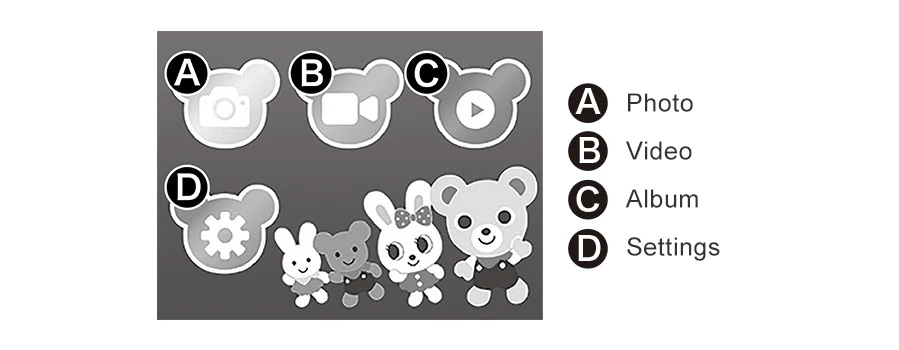
【A】Photo Mode
- *Initialize MicroSD card before use. For details, please refer to the Settings section.
- *Supports MicroSD cards up to 64GB. Cards exceeding 64GB are not supported.
①Take Photos
Press the shutter button to take a picture. The remaining number of shots is displayed in the top right corner of the screen.
Press the right button to switch to selfie mode.
②Photo Frame / Sticker
Use the Up/Down buttons to switch frames and filters.
③Zoom Function
Press and hold the Up botton to zoom in. Press and hold the Down button to zoom out.
【B】Video Mode
- A MicroSD card is required.
Video recording is not available without a MicroSD card.
①Record Video
Press the shutter button to start recording, and press it again to stop. The available recording time is displayed in the upper right corner of the screen.
Press the right button to switch to selfie mode.
②Quick Motion / Slow Motion
Use the Left button to switch modes.
【C】Album
①View Photos
Use Left/Right buttons to browse images.
②Play Videos
Press the shutter/confirm button to play, and press it again to stop.
③Delete Files
Press Up/Down to display delete confirmation, then press shutter to delete.
【D】Settings
①Self-timer
Self-timer setting (Off / 2 sec / 5 sec / 10 sec)
②Video Size
Image resolution setting (1080P / 720P / VGA)
③Loop Recording
Loop recording allows video to be recorded continuously in segments at set intervals (Off / 3 min / 5 min / 10 min).
④Date & Time Display
Display date information on photos (Off: Hide / On: Show)
⑤Language
Language selection
⑥Screen Saver
Set screen timeout (Off / 1 min / 2 min / 3 min)
⑦Power Saving settings
Set auto power-off time (Off / 3 min / 5 min)
⑧Screen Brightness
Adjust screen brightness (1‒8)
⑨Volume
Adjust operation sound volume (0‒15)
⑩Format (Initialize SD Card)
Data initialization: All images stored on the camera and all photos and videos stored on the MicroSD card will be deleted.
*Before using the camera for the first time, please make sure to initialize the MicroSD card. If not initialized, the card may not function properly.
Please note that initializing will erase all existing data on the card.
⑪Date / Time Setting
Set the system date and time of the device
⑫Reset
System initialization
⑬Version Information
Camera version information
Basic Operations
①Charging
Please connect the included charging cable to a USB charger to charge the device.
A USB charger is not included.
②Reset
If the camera malfunctions, press the reset button using a pointed object to restart it.
③Transfer Photos to PC
Insert the MicroSD card into a computer or compatible device to transfer data.
- *Only photos stored on the MicroSD card can be transferred to a computer.
- *Images saved in the camera’s internal memory can only be viewed on the device.
Warranty Terms
- If a malfunction occurs under normal use conditions as described in the instruction manual, packaging, or general usage guidelines, we will replace it with a new one free of charge, in accordance with the terms of the product warranty.
- If a product malfunctions during the warranty period and you wish to receive a free replacement, please present or attach the warranty card to your request. Please note that we will cover all shipping costs.
- As a general rule, we cannot accept exchanges or returns after the warranty period has expired. Please note that even within the warranty period, we cannot offer free replacement in the following cases:
1) If you do not present the warranty card.
2) When the required information on the warranty card is not filled in, the words have been altered, or the name of the purchase store is not displayed.
3) Damage, malfunction, and injury to the product caused by the use of consumables other than those manufactured by our company.
4) Malfunctions and damage caused by fire, earthquake, flood, lightning, other natural disasters, pollution, or abnormal voltage.
5) Malfunctions and damage caused by improper handling, such as dropping the product during shipping or transportation after purchase.
6) Malfunctions and damage caused by handling contrary to the usage instructions or warnings described in the instruction manual.
7) Malfunctions and damages that are deemed to be attributable to modification or misuse.
8) Replacement of consumables.
9) When the product name or product number of the product is illegible or difficult to identify. - Consumables and regularly replaced parts are not covered by the warranty.
- The warranty is valid only in Japan.
- The warranty card will not be reissued, so please keep it safe and do not lose it.
- If you have any questions about the product, please contact the store where you purchased it or our Customer Service Center.
【Customer Service Center】
TEL:072-920-2039
*10:00~17:00 (Excluding weekends and holidays)
Warning and Caution
Warning
Warnings for Parents/Guardians: Please read.
- Choking hazard: contains small parts. Never give to children under the age of 3.
- Please use under the supervision of a guardian to prevent dangerous use.
- USB cables pose a strangulation risk. Do not let children play with them.
Caution
- For safety reasons, please cease use if broken, deformed, or deteriorated.
- If any small parts come off, please dispose of them immediately.
<Misuse of the built-in rechargeable battery may cause overheating, rupture, fire, or leakage. Please note the following.>
- Short-circuiting will cause a dangerous large current to flow. Please avoid this at all costs.
- Never recharge a camera that has already been charged. This can lead to overcharging and is dangerous.
- Stop using the device immediately if it gets wet. This may cause a short circuit.
- Never put the device in water or fire, disassemble it, or solder it.
- Do not use, charge, or store the device near fire or in high-temperature or high-humidity areas.
- When disposing, please follow the applicable disposal classifications mandated by your local government.
Precautions
- Please read the included instruction manual carefully before use.
- Please keep out of reach of small children and use under the supervision of a guardian.
- Do not expose to direct sunlight for extended periods. Do not use near open flames, in damp places, or in other hot and humid areas.
- Do not drop, hit or subject this product to strong impact.
- Do not short-circuit, disassemble, heat, or put into fire.
- This device is not waterproof. Do not get the device wet or submerge it in water, as this may cause it to malfunction.
- Do not wrap the strap around your neck or other body parts during play. To prevent accidents caused by entanglement, remove immediately if it becomes entangled around your hands or feet.
- Always charge the device using the included USB cable under the supervision of a guardian. Do not touch the cord with wet hands, as this may cause electric shock.
- Do not use USB cables while still bundled together. Also, do not use damaged cables.
- When plugging in or unplugging the USB cable, always hold the connector part.
- If the device overheats abnormally while charging, immediately unplug the cord and stop use.
- If you notice any unusual odors or smoke during use, immediately stop using the device and turn off the power.
- When printing or viewing images taken with this product on a computer, the data will be stretched, resulting in a lower image quality.
- Keep the packaging out of reach of small children and refer to it as needed.
- The packaging materials are not toys. Please remove all packaging before giving the product to your child.
- Product specifications are subject to change without notice. Please also note that the photos and illustrations on the packaging may differ slightly from the actual product due to improvements, etc.
